Statuses and History
Introduction
This document helps you understand the statuses and history of nodes in Conductor's workflow graphs. This is a conceptual overview. To see how these concepts are represented in the desktop app's monitor interface, please refer to the Working with nodes howto.
Statuses
You'll encounter 7 statuses that have meaning for the evaluation of nodes in a workflow.
| Status | Description | |
|---|---|---|
 | open | An open node will transition to running as soon as all its inputs are ready. |
 | holding | A holding node will not transition to running, even when its inputs are ready. You must manually unhold it. |
 | running | A running node is working. It could be finding or provisioning instances, executing a render, copying files, etc. |
 | succeeded | A succeeded node has completed successfully. Downstream nodes may now run. |
 | skipped | A skipped node did not complete successfully because you manually skipped it. However, downstream nodes may still run. |
 | failed | A failed node has not completed successfully. Downstream nodes will not run. |
 | canceled | A canceled node was stopped by you. Downstream nodes will not run. |
Transitions
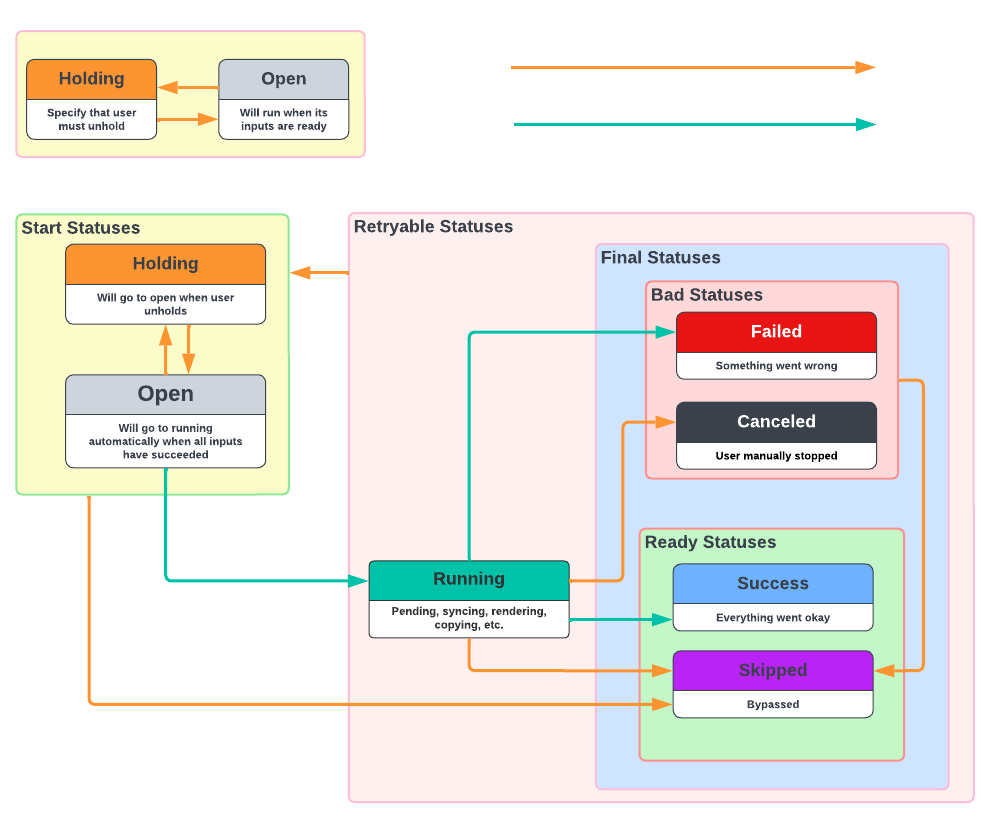
The diagram above shows how transitions change a node's status. They are triggered manually by you, or procedurally by the workflow engine.
- Manual transitions are shown as orange arrows.
- Procedural transitions are green arrows.
It's helpful to group transitions hierarchically to make reasoning about them easier. The hierarchy of SuperStates is as follows:
- Start Statuses
- open
- holding
- Retryable Statuses
- running
- Final Statuses
- Ready Statuses
- succeeded
- skipped
- Bad Statuses
- failed
- canceled
- Ready Statuses
| Transition | Description | |
|---|---|---|
| ➜ | hold | You can hold an open node. It will go to holding. |
| ➜ | unhold | You can open a holding node. |
| ➜ | skip | You can skip any node that is not in one of the ready statuses. Skipped is a ready status, which means that downstream nodes may now run. |
| ➜ | cancel | You can cancel a running node. You cannot cancel nodes in start statuses, since it's functionally equivalent to holding. |
| ➜ | run | An open node will transition procedurally to running as soon as all its inputs are ready. |
| ➜ | succeed | A running node will transition to succeeded if it completes without failing and without being canceled or skipped by you. |
| ➜ | fail | A node that experienced an error will transition to failed. |
Updates
When you edit the parameters of a node, you are performing an update. It's useful to understand that there are two types of updates:
- Update from a start status (open, holding).
- Update from a retryable status (running, skipped, failed, canceled, succeeded).
Update from a start status
Since a node with a start status has not run, your update simply changes the node parameters so that when it does run, it will do so with the new parameters.
Update from a retryable status
If you update a node that is already running, or is in a final status, you'll be performing a retry. If the node is running it is canceled first. Then the node parameters are updated and the node is put back in the start status. If any downstream nodes are in a retryable state, they will also be retried.
Update options
Since any update results in the node returning to a start status, you have the convenience of also specifying which start status the node should transition to. You can either:
- Update: Transitions to the node's status at the time it was submitted.
- Update with holding: Force transition to holding.
- Update with open: Force transition to open.
Simple retry
You can think of a simple retry as an update with no parameter edits.
Allowable actions
The following table shows which actions you can perform for each status.
| Status | Manual Transitions | Procedural Transitions | |
|---|---|---|---|
| open | Update Hold Skip | Run |
| holding | Update Open Skip | |
| running | Update Skip Cancel | Succeed Fail |
| skipped | Update Cancel | |
| failed | Update Skip | |
| canceled | Update Skip | |
| succeeded | Update Cancel |
Any time you update a node in the edit node dialog, you'll have the option to also specify holding or open.
History
Base and Current Configurations
You can edit a node's parameters before it runs and you can revert to the initial configuration. To achieve this efficiently, we maintain the node's base configuration at the time of submission then subsequent edits are represented as a patch with respect to the base configuration.
- The base configuration is the configuration of the node at the time it was submitted.
- The current configuration is the configuration of the node at the time it runs.
- Every node has a base configuration and a current configuration.
| Configuration | Alias | Mutability | Description |
|---|---|---|---|
| current | current | mutable | The configuration of the node when it runs |
| base | init | immutable | The configuration of parameters at submission time |
Example:
Here is the base configuration for an email node:
{
  "addresses": [
    "info@conductorio.com",
    "test@conductorio.com"
  ],
  "subject": "Congratulations! Completed: ${workflow-id}",
  "body": "The job with ID ${workflow-id} has been successfully completed."
}
And here is the patch for the current configuration:
{}If you now edit the node, the current configuration is updated with the new parameters. The base configuration remains unchanged. By changing the subject the current patch becomes:
{
  "subject": "Hello! ${workflow-id} is finished"
}
The system merges it with the base configuration to form your complete current configuration.
When you decide to revert to the initial configuration, your current configuration is replaced with base configuration. Since your current configuration is a patch with respect to the base configuration, the result is that your current patch becomes empty again.
Snapshots
When you retry a node that is in a retryable status, with or without edits, the node's history is updated with a snapshot of your current configuration.
Unlike nodes in start statuses, you should consider a node that is in a retryable status to be effectively frozen and historically interesting. To recap, that means when you have a node that has started running, or reached a final status, it will be snapshotted if you retry it. If you don't retry it, then your current configuration represents the node's state, and therefore does not need to be snapshotted.
| Configuration | Alias | Mutability | Description |
|---|---|---|---|
| current | current | mutable | The configuration of the node when it runs |
| snapshot | snap(2) | immutable | A snapshot of the current configuration when the node was retried |
| snapshot | snap(1) | immutable | A snapshot of the current configuration when the node was retried |
| base | init | immutable | The configuration of parameters at submission time |
Cascades
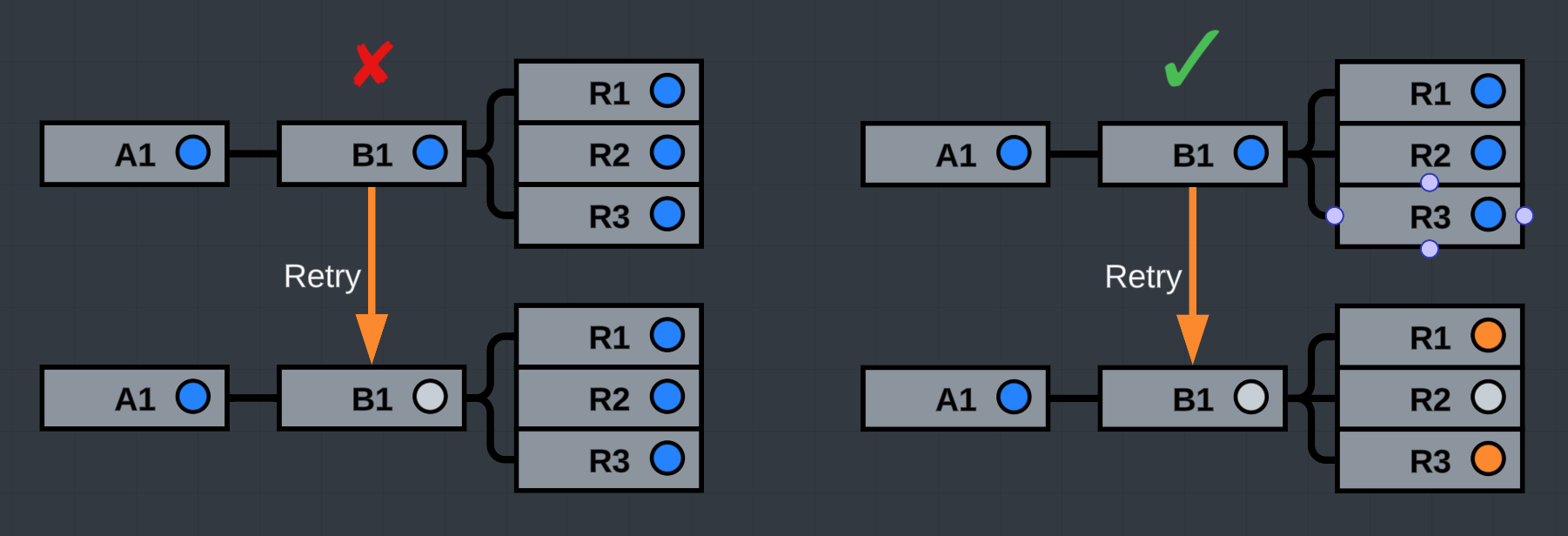
When you retry a node that is in a retryable status, downstream nodes in a retryable status are also retried in a cascading fashion.
Example:
If a Nuke task is downstream from a render task, and the render task is retried, then the Nuke task will be issued a retry too. A snapshot for the Nuke task is created, and the Nuke task will will be set back to it's start status.
This keeps the graph integrity in tact. It means you'll never see an open, or holding node upstream from a node that has started running. The only statuses that can be upstream of a node that has started, are skipped and succeeded.
Conclusion
Understanding node statuses, transitions, and history is crucial for effectively managing advanced workflows in Conductor. Statuses provide clear visibility into the progress of your workflow, while snapshots keep a detailed record of configuration changes for every node. This allows you to examine the past node configurations to see how those changes affected the workflow, and to replay them if you'd like.
For a practical demonstration of how this history is displayed and used in the application, please refer to the Working with nodes howto, which shows how these concepts are represented in the desktop app's monitor interface.